Your Coach Doesn't Use a Stats App. Here's What You Can Track Yourself.
By the RinkTally team at TallyNorth Inc.
Updated November 2026
Yes, a parent can track their own child's hockey stats even if the coach does not use an app. In RinkTally, solo tracking is free and uses the same Simple and Advanced stats as parent tracking on a team.
Can you track your child's stats without the coach?
Yes. In RinkTally, you can track your player's stats yourself from any game. Nobody else is involved and nothing is shared. Later you can join a team or set up your own, but you don't need to wait.
What's worth tracking as a parent
Simple mode tracks touches, shots, goals, and assists. Advanced mode adds passes made, passes received, penalties, and shifts. Start with Simple — it's easier to watch the game when you're tapping four things instead of eight. If your child plays goalie, goalie tracking and goalie stats are free.
Simple and Advanced stats
Solo tracking uses the same stat sets as parent tracking. One tap per event, and Undo is there if you mis-tap. Start the game where you have signal; after that it works with no bars, so you can track in rinks with poor reception. Your taps are saved on your phone and upload when you end the game.
Tracking solo with RinkTally
Your child doesn't need an account. A parent 18 or older enters the player's name and whether they play skater or goalie — that's the whole setup. One account covers every child.
Tracking, recaps and your full session history are free. Every session is kept, and you can open one to see the detail or edit a count by hand. Missed a game? Add it afterwards from the Team tab with the date and your player's totals.
Shot maps are free for the first three games per player. Viewing shot charts is always free.
RinkTally Pro for parents adds season trends and unlimited shot maps — and, once your player is on a coach's team, their per-game chart. It's $4.99/month or $29.99/year. Prices vary by region and are shown in the app. Apple or Google bills you. One subscription covers every player you track. Deleting the app or your account doesn't cancel the subscription.
Sharing a recap (and keeping your child's name off it)
At the final horn, share the score and stats as a picture. Recaps show the jersey number only, not your child's name. You can also let family follow the live score.
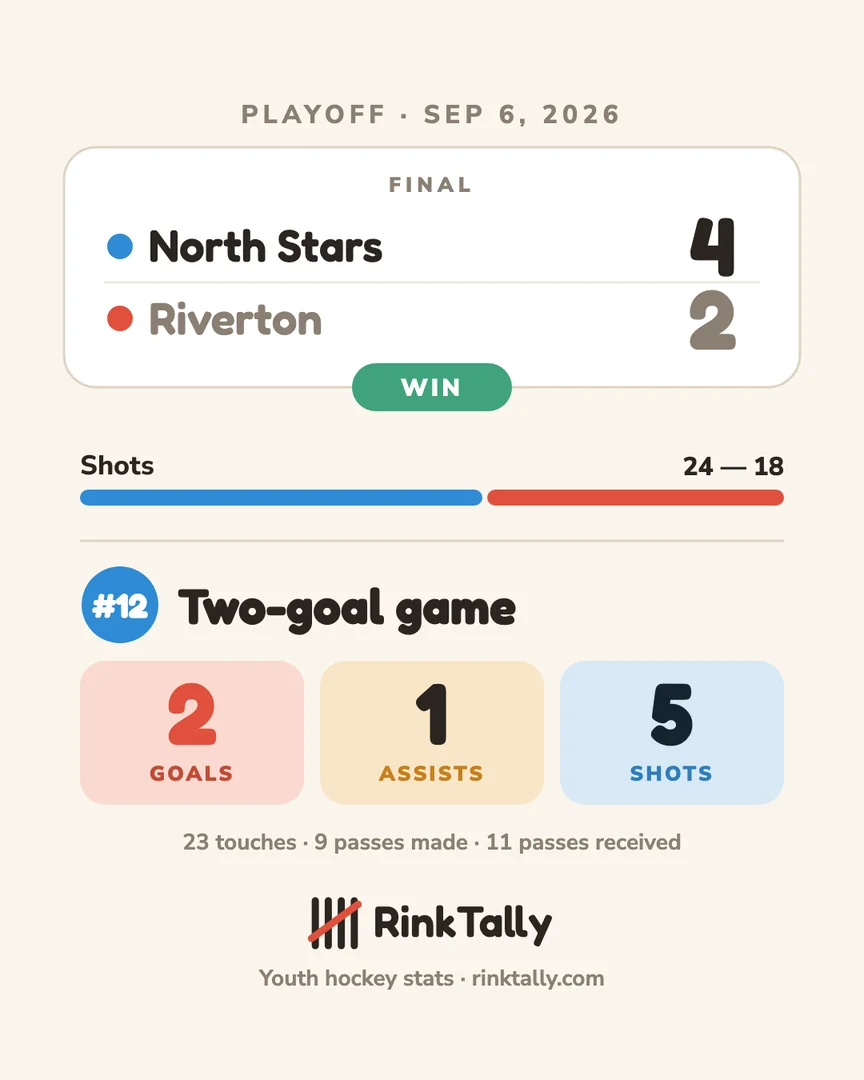
The player card
If your coach wants to try it
Tell Your Coach opens your share sheet with a message suggesting they set up the team. If the coach later uses RinkTally, parent tracking doesn't overwrite the coach's official record for score, goals, or penalties. Your stats stay yours. Learn more about how coaches track a game from the bench.
You can also read the coach guide.
Frequently Asked Questions
Can I track my child's stats if the coach doesn't use RinkTally?
Yes. You can track your own player on your own, and it uses the same Simple and Advanced stats as parent tracking.
Does my child need an account?
No. Kids do not have accounts. A parent sets up the player.
Can I track more than one child?
Yes, and it's free. On the Team tab, Add another player puts a brother or sister on the same account. Each keeps their own games and stats, and you switch between them at the top of Home.
Is it free?
Yes. Tracking, recaps and your full session history are free.
Can I add games I didn't track?
Yes. On the Team tab, Add a past game lets you pick the date on a calendar and enter your player's totals, and the final score if you have it. It's free.
What does RinkTally Pro cost?
$4.99 a month or $29.99 a year, and prices vary by region. It adds season trends and unlimited shot maps, plus your player's per-game chart once they're on a coach's team.
Can I track my child when they play goalie?
Yes. Goalie tracking and goalie stats are free.